How to Optimise a New Page for the Keywords You Want to Rank For (On-Page + Off-Page SEO)
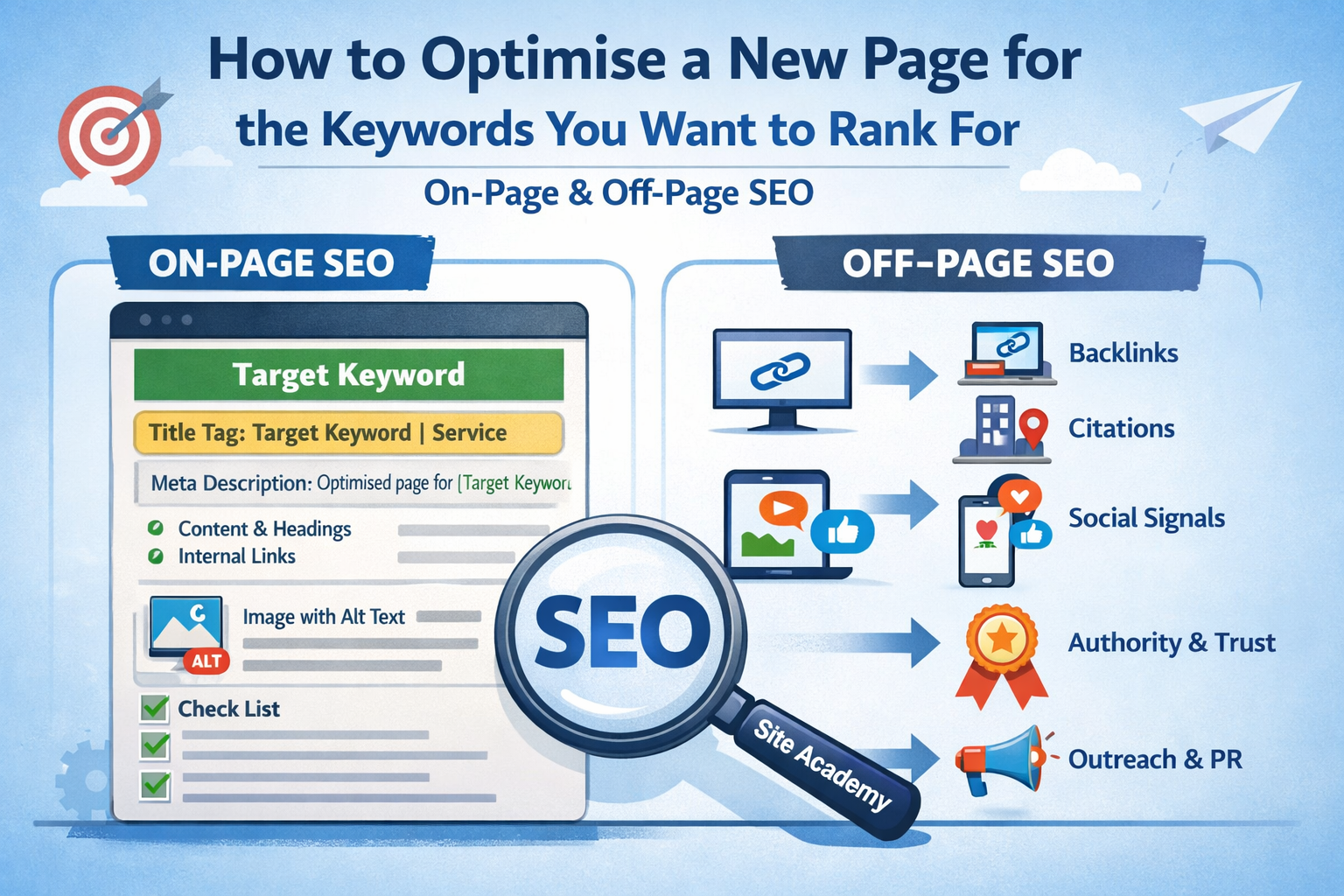
Creating a new page is easy.
Optimising it properly is where most people go wrong.
A lot of website owners and small businesses do the same thing when they want to rank for a new keyword:
- they create a new page
- they add the keyword to the title
- they mention it a few times in the content
- they hit publish
- and then they wait
Sometimes they even think:
- “That page is live now, so Google should pick it up”
- “I used the keyword, so it should rank eventually”
- “The page exists, so the SEO work is done”
But that is rarely enough.
Publishing a new page does not automatically make it optimised.
And this is one of the biggest reasons new pages often sit there doing very little.
Because there is a huge difference between:
- creating a page that mentions a keyword
and - building a page that is properly aligned, technically clean, internally supported, and externally reinforced
If you want a new page to rank, it is not just about writing the page.
It is about giving that page the right signals — both on-site and off-site — so search engines can understand:
- what the page is about
- which keyword it should be associated with
- what intent it satisfies
- how it fits into the rest of the website
- whether it deserves to be trusted and pushed higher
That is what this guide is about.
If you are creating a new service page, landing page, blog post, category page, or any new URL that you want to rank for a specific keyword, this is the process you should follow.
And if you want to check whether you have actually done it properly, you can use the free SEO checker on Site Academy, which helps review both on-site SEO and the wider signals that affect performance. It gives you a clear SEO score, practical fixes, and a repeatable checklist you can use for every new page you publish.
The biggest mistake: targeting a keyword without a real optimisation plan
A lot of people think page optimisation is basically:
- put the keyword in the title
- put the keyword in the H1
- mention it in the content
- done
That is not really optimisation.
That is the bare minimum signal alignment.
Real page optimisation means making sure the page is:
- targeting the right keyword
- matching the right intent
- built with a clear on-page structure
- easy for Google to crawl and understand
- supported by internal links
- discoverable and indexable
- reinforced by off-page signals like links, mentions, and page authority
In other words:
A page should not just exist.
It should be positioned.
That is the mindset shift.
Step 1: Choose one clear primary keyword (not ten)
Before you write or optimise anything, decide what the page is primarily trying to rank for.
This sounds obvious, but it is where many pages go wrong.
A lot of new pages try to rank for:
- several services
- several keyword variations
- multiple locations
- broad and narrow intent at the same time
That creates confusion.
Instead, every important new page should usually have:
- one clear primary keyword
- a handful of closely related supporting variations
For example, if you are creating a new page for:
Primary keyword:
- boiler repair in Guildford
Supporting phrases might be:
- emergency boiler repair Guildford
- boiler repair service Guildford
- boiler engineer Guildford
But the page should still have one main focus.
That helps keep:
- the title clearer
- the H1 clearer
- the structure cleaner
- the intent stronger
- the page purpose more obvious
Step 2: Match the search intent before you optimise anything
This is one of the most important steps, and a lot of people skip it.
Before optimising a page, ask:
What is the searcher actually trying to achieve when they type this keyword?
Because if your page does not match the intent, even “perfect SEO” can still underperform.
For example:
If someone searches:
- boiler repair in Guildford
They probably expect:
- a service page
- local relevance
- trust signals
- fast contact options
- clear service information
They probably do not expect:
- a blog post about how boilers work
- a vague homepage
- a broad services page listing 20 services
If someone searches:
- how to fix a boiler pressure issue
They likely expect:
- a guide
- step-by-step information
- practical help
- maybe when to call a professional
That is a completely different page type.
This matters because one of the most common SEO failures is:
- the keyword is right
- the page is live
- the page is technically fine
- but the page format is wrong
Optimisation starts with intent alignment, not just keyword placement.
Step 3: Make the URL clean, focused, and relevant
Your page URL should help reinforce the topic clearly.
Good examples:
/boiler-repair-guildford//emergency-plumber-richmond//seo-audit-checklist/
Avoid messy URLs like:
/page?id=14/services-page-new-final-v2/category/service-landing-page-2026/boiler-repair-guildford-best-boiler-repair-company-near-me
A good URL is usually:
- short
- readable
- descriptive
- aligned to the page topic
- stable (do not keep changing it)
Your URL does not need to be stuffed with every keyword variation.
It just needs to make the page theme obvious.
Site Academy’s Keyword Optimiser is also useful here, because it checks whether your URL, title, meta description, and H1 are aligned to the keyword you want to target, based on your most recent completed audit.
Step 4: Write a strong page title (title tag) for the primary keyword
Your title tag is still one of the most important on-page signals for a new page.
A good title should:
- include the primary keyword naturally
- make the page purpose obvious
- encourage clicks
- avoid looking spammy
- stay focused
Examples:
- Boiler Repair in Guildford | Fast Local Repairs
- SEO Audit Checklist for New Pages | Site Academy
- Emergency Plumber in Richmond | Same-Day Help
Common mistakes:
- titles too vague
- titles too long
- keyword stuffing
- using the same title pattern everywhere
- trying to cram multiple intents into one title
A title is not just a keyword container.
It is a signal to both:
- search engines
- human searchers
And if Google keeps rewriting your titles, that can be a sign the title is too weak, too generic, too long, duplicated, or not aligned with the page content. That is something you have already started covering on Site Academy, and it is a useful reminder here too. (siteacademy.co.uk)
Step 5: Write a meta description that supports clicks (not rankings directly)
Meta descriptions are not a major direct ranking factor in the way title tags are.
But they still matter because they can improve:
- click-through rate
- clarity
- user confidence
- search result appeal
A good meta description should:
- support the keyword theme naturally
- explain what the page offers
- reinforce intent
- encourage a click
For example:
“Need boiler repair in Guildford? Fast local repairs, honest pricing, and experienced engineers. Learn more or request help today.”
Do not:
- stuff it with repeated keywords
- duplicate the same meta across multiple pages
- leave it blank if you can avoid it
Step 6: Use one clear H1 that matches the page’s purpose
Your H1 should make the page purpose immediately obvious.
It should usually:
- reinforce the main topic
- align with the title
- feel natural to a human
- avoid trying to cover multiple unrelated targets
Examples:
- Boiler Repair in Guildford
- How to Optimise a New Page for SEO
- Emergency Plumber in Richmond
A lot of pages go wrong because:
- the H1 is missing
- the H1 is generic
- the H1 does not match the keyword target
- the H1 and title are pulling in different directions
This is one of the exact checks Site Academy’s tools can help you verify quickly. The free SEO checker reviews heading structure, title/meta quality, and common on-page issues, while the Keyword Optimiser specifically checks alignment between the page and the keyword you want to rank for.
Step 7: Build the page around the keyword theme, not just the keyword phrase
This is where many people over-simplify SEO.
They think optimisation means repeating the keyword enough times.
It does not.
A properly optimised page should be built around the topic and intent, not just the exact phrase.
That means the page should naturally cover:
- the main service/topic
- related subtopics
- common questions
- supporting terminology
- things a real searcher expects to see
For example, a page targeting:
- boiler repair in Guildford
Should probably include:
- what the service covers
- common repair issues
- response times
- areas served
- why choose you
- FAQs
- trust signals
- how to book
- related services
Not just:
- repeating “boiler repair in Guildford” 14 times
The goal is:
- clarity
- completeness
- usefulness
- relevance
Not density.
Step 8: Use proper heading structure (H2s, H3s) to support depth
A strong page should not be a wall of text.
Use structured headings to make the page easier to:
- read
- scan
- understand
- crawl
For example:
- H1: Boiler Repair in Guildford
- H2: Common Boiler Problems We Fix
- H2: Why Choose Our Guildford Boiler Repair Service
- H2: Areas We Cover
- H2: Frequently Asked Questions
- H2: Book a Repair
This helps:
- reinforce relevance
- create topic depth
- improve user experience
- make the page feel complete
It also often makes the page more likely to satisfy intent properly.
Step 9: Add internal links from relevant existing pages
This is one of the most overlooked parts of launching a new page.
A lot of people publish the page… and then do nothing to support it internally.
That is a mistake.
If you want a new page to rank, you should usually link to it from:
- the homepage (if it is important enough)
- relevant service pages
- related blog posts
- category or hub pages
- location pages
- navigation (where appropriate)
This helps with:
- discovery
- crawlability
- page importance
- relevance
- authority flow
Good internal links should:
- come from relevant pages
- use natural anchor text
- make contextual sense
- not all be identical
Example anchor text:
- “boiler repair in Guildford”
- “our Guildford boiler repair service”
- “fast local boiler repairs”
Site Academy’s free checker also looks at internal linking as part of its on-page review, which is useful because a lot of “new page not ranking” problems come down to the page being weakly supported internally.
Step 10: Make sure the page is actually indexable
This sounds basic, but it catches people out all the time.
Before you worry about rankings, make sure the page can actually be indexed.
Check:
- no
noindextag - not blocked in robots.txt
- canonical points to itself (or the correct URL)
- no duplicate/conflicting versions
- returns a proper 200 status
- not accidentally hidden behind scripts or odd rendering issues
A surprising number of pages are “optimised” but still have technical issues that reduce or prevent visibility.
Site Academy’s free SEO checker specifically checks for:
- indexability signals
- canonical tags
- title/meta issues
- heading structure
- crawl signals
- technical SEO basics
That makes it ideal for reviewing a newly published page before you start wondering why it is not moving.
Step 11: Optimise images and page assets properly
Images matter more than people think.
For a new page:
- compress images properly
- use sensible file names
- add relevant alt text where appropriate
- avoid giant uncompressed uploads
- make sure visuals support the page, not slow it down
This helps:
- performance
- accessibility
- user experience
- sometimes image relevance signals
Do not treat image optimisation as a magic ranking hack.
But do treat it as part of making the page cleaner and stronger overall.
Step 12: Add trust signals to make the page more believable
A lot of pages fail because they are technically optimised… but they do not feel trustworthy.
This is especially true for:
- service pages
- local pages
- commercial landing pages
Strong trust signals might include:
- testimonials
- reviews
- credentials
- accreditations
- guarantees
- years of experience
- real team/founder details
- local proof
- case studies
- clear contact information
A page that feels trustworthy often performs better than one that just “contains the keyword”.
This is a huge part of modern SEO that people still underestimate.
Step 13: Add the page to your sitemap and help discovery
If the page is important:
- make sure it is in your XML sitemap
- ensure it is linked internally
- optionally submit it in Google Search Console
A new page with no internal links and weak discovery signals can take longer to get properly picked up.
Help search engines find it.
Do not just publish and hope.
Step 14: Build off-site support — because on-page alone is often not enough
This is the part many people ignore.
A page can be well optimised on-site and still not move much.
Why?
Because optimisation makes the page eligible.
It does not automatically make it competitive.
If you are targeting a keyword with any real competition, off-site signals often matter.
That can include:
- backlinks to the page
- internal brand mentions
- directory mentions (for local businesses)
- citations (where relevant)
- relevant mentions from partner or supplier sites
- guest posts or contextual placements
- natural link acquisition through useful content
This is especially true for:
- new service pages
- fresh landing pages
- newer websites
- local competition
- keywords where other pages already have authority
Site Academy actually explains this really well on the free SEO checker page:
“If your on-page SEO is improving but growth feels slow, it’s usually because Google hasn’t found (or trusted) the page yet.”
That is exactly right.
Step 15: Use off-site links intelligently (not randomly)
If you are building links to a new page, be strategic.
Good off-site support usually means:
- relevant placements
- contextual links
- anchor text variation
- a natural mix of brand + URL + keyword-based anchors
- links pointing at the page you actually want to push
Do not:
- spam exact match anchor text everywhere
- point every link at the homepage when the new page is the real target
- buy junk links from irrelevant sites
- create obvious manipulative patterns
A better mix might look like:
- brand anchor
- naked URL
- partial match keyword
- generic anchors
- occasional exact-ish match where it makes sense
Site Academy’s link building flow is actually built around this idea too — you can provide up to 5 keyterms so the anchors can align to the page you are actually targeting, rather than guessing or sending all link equity to the homepage.
Step 16: Re-scan the page and refine it after publishing
A lot of people treat publishing as the end.
It is not.
Publishing is the beginning.
After the page is live:
- run an SEO audit
- check the score
- fix any missed basics
- review title/meta/H1 alignment
- check internal links
- confirm indexability
- watch impressions and clicks
- refine based on real data
Site Academy is particularly useful here because it is built around:
- scan
- get a score
- fix issues
- re-scan
- track improvement
That makes it ideal as a repeatable process for every new page you publish. The site explicitly recommends scanning your homepage first, then your key landing pages and service pages — which is exactly the right order for a growing site.
A simple optimisation checklist for every new page
If you want a practical repeatable workflow, use this:
Before publishing
- Choose one clear primary keyword
- Confirm the search intent
- Create a clean URL
- Write a focused title tag
- Write a useful meta description
- Add one clear H1
- Build the page around the topic, not just the phrase
- Add helpful H2/H3 structure
- Include trust signals
- Optimise images
- Check indexability basics
After publishing
- Link to the page internally
- Add it to your sitemap
- Submit to Search Console if needed
- Run a free SEO audit
- Check title/meta/H1/URL alignment
- Fix any technical or on-page issues
- Start building relevant off-site support
- Monitor impressions and refine
The truth about new pages and rankings
A new page rarely ranks just because it exists.
It ranks when:
- the keyword target is clear
- the intent is right
- the page structure is strong
- the on-page signals are aligned
- the technical setup is clean
- the page is internally supported
- the page is discoverable
- the site feels trustworthy
- and the page gets enough authority and relevance over time
That is why some new pages move quickly and others sit still.
It is usually not because “Google is random”.
It is because the page was published…
…but never fully optimised.
Final thought
If you are creating a new page to target a keyword, do not stop at “the page is live”.
That is only the starting point.
The real work is making sure the page is:
- aligned to one clear target
- built for the right intent
- technically clean
- properly structured
- internally supported
- strong enough to deserve trust
- and backed by the right off-site signals
That is how you give a new page the best chance to rank.
And if you want a simple way to check whether you have actually done that properly, use the free SEO checker on Site Academy.
It is a practical way to review both the on-page fundamentals and the wider issues that often hold new pages back — from titles, headings, and internal links to technical crawl signals and the broader trust/authority gap that often means a page needs more than just on-site tweaks. You can also use the Keyword Optimiser to check whether your title, meta description, H1, and URL are aligned to the exact keyword you want that page to rank for.
Because the best pages do not just get published.
They get positioned properly.
Share this content:


Post Comment