Open Graph Meta Tags Explained: How OG Properties Control Social Sharing and Improve Click-Through
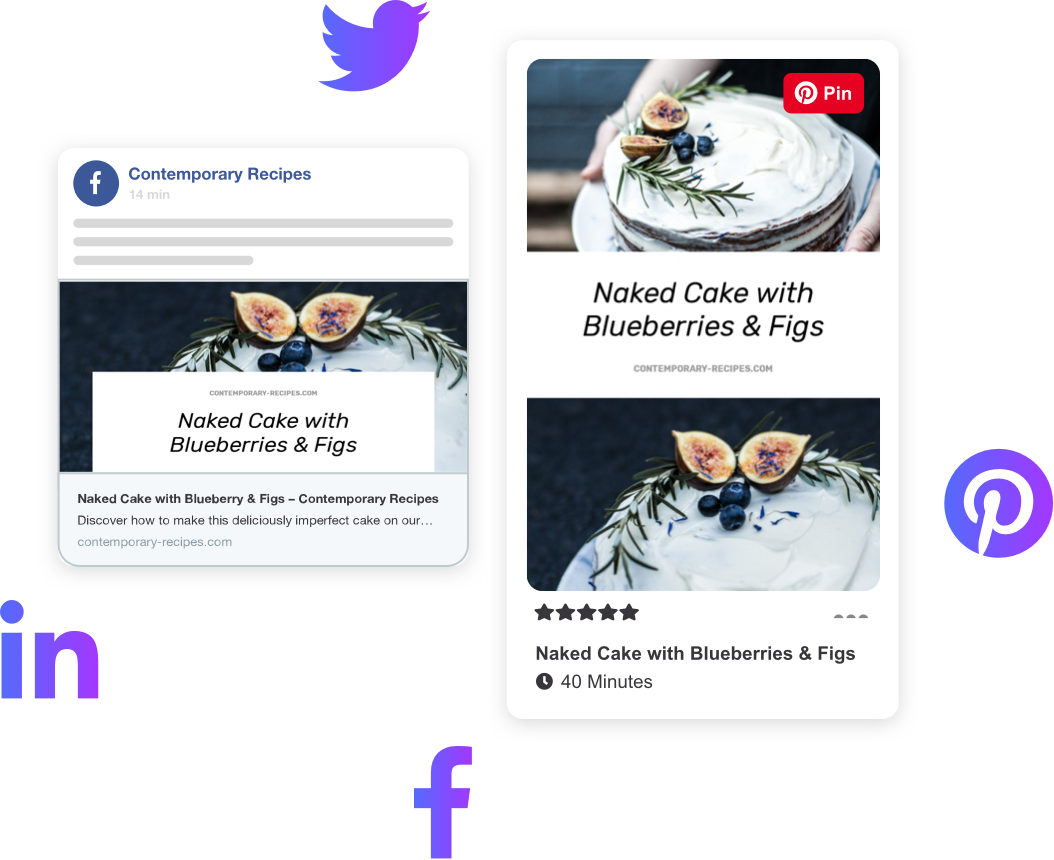
When someone shares a link to your website on social media, messaging apps, or collaboration tools, the preview that appears is not random. It is controlled by Open Graph (OG) meta properties.
Without them, platforms guess. When platforms guess, results are inconsistent, ugly, or misleading — and that costs clicks.
This article explains what Open Graph is, how OG properties work, which tags matter most, and how to implement them correctly so your pages always look intentional when shared.
What is Open Graph?
Open Graph is a standard that allows web pages to describe themselves to external platforms using meta tags placed in the <head> of a page.
These tags tell social platforms:
- What title to display
- What description to use
- Which image to show
- What type of content the page represents
In short: Open Graph controls link previews.
It does not directly affect Google rankings, but it has a measurable impact on:
- Click-through rate
- Brand trust
- Shareability
- Visual consistency across platforms
Why Open Graph matters for SEO (even though it’s “not a ranking factor”)
While OG tags do not influence rankings directly, they strongly affect user behaviour, which absolutely matters.
Better previews lead to:
- Higher engagement
- More clicks from social traffic
- Increased dwell time
- More backlinks from shared content
- Better brand recognition
SEO does not stop at the search results page. Open Graph is part of the wider optimisation ecosystem.
The core Open Graph properties you should always use
At minimum, every indexable page should include the following:
og:title
The title shown in social previews.
Best practices:
- 40–60 characters
- Human-readable, not keyword-stuffed
- Can differ slightly from the HTML title
- Should clearly describe the page
og:description
The summary text shown under the title.
Best practices:
- 1–2 short sentences
- Avoid truncation
- Focus on clarity, not sales copy
- Should expand on the title, not repeat it
og:image
The image shown in the preview.
Best practices:
- Use a dedicated image per page where possible
- Minimum 1200 × 630 pixels
- High contrast, readable on mobile
- No tiny text or clutter
- Absolute URL required
This is the most visually impactful OG property — and the most commonly broken.
og:url
The canonical URL of the page.
Best practices:
- Must match the canonical URL
- Prevents duplicate previews
- Essential for pages accessible via multiple URLs
og:type
Describes what kind of content the page is.
Common values:
websitearticleproductprofile
Use article for blog posts and guides. Use website for general pages.
Recommended (but often missed) Open Graph properties
og:site_name
Your brand or site name.
This improves trust and recognition in social feeds, especially when users are unfamiliar with your domain.
og:locale
Specifies language and region, such as:
en_GB
This helps platforms present content correctly for international audiences.
Image rules that actually matter (and why previews break)
Most Open Graph failures come down to images.
Common problems:
- Image too small
- Image blocked by robots.txt
- Image served via relative URL
- Image behind authentication
- Image format not supported
Safe formats:
- JPEG
- PNG
- WebP (increasingly supported, but not universal)
Always test images with social debuggers after publishing.
Open Graph vs Twitter Cards
Twitter (X) supports Open Graph but also has its own tags.
If Twitter-specific tags are missing, it will usually fall back to OG tags.
Best practice:
- Implement Open Graph first
- Add Twitter Card tags only if you want platform-specific control
OG is the foundation.
How Open Graph interacts with canonical URLs
If your og:url does not match your canonical URL:
- Platforms may treat shares as separate pages
- Engagement metrics can fragment
- Previews may update inconsistently
Your SEO checklist should always confirm:
- Canonical URL exists
og:urlmatches exactly
Common Open Graph mistakes (and how to fix them)
Missing OG tags entirely
Fix: Add a full OG block to every public page.
Using the same OG image everywhere
Fix: At minimum, vary images by page type.
Auto-generated junk descriptions
Fix: Write intentional summaries — social previews are copy, not metadata.
Letting platforms scrape before images exist
Fix: Publish images first, then pages.
Where Open Graph fits in a proper SEO Checker
A modern SEO checker should check:
- OG tags present
- Required properties populated
- Image dimensions valid
- Absolute URLs used
- Canonical alignment
- Page-specific uniqueness
- No blocked OG resources
If any of these fail, social visibility is compromised — even if Google rankings look fine.
Practical implementation example
<meta property="og:title" content="Open Graph Meta Tags Explained">
<meta property="og:description" content="Learn how Open Graph meta tags control social previews and improve click-through from shared links.">
<meta property="og:image" content="https://example.com/images/og-preview.jpg">
<meta property="og:url" content="https://example.com/open-graph-guide">
<meta property="og:type" content="article">
<meta property="og:site_name" content="SiteAcademy">
<meta property="og:locale" content="en_GB">
Clean. Predictable. Platform-friendly.
Final thought
If SEO gets users to your page, Open Graph convinces them to click it.
Ignoring OG properties means handing control of your brand presentation to guesswork and algorithms. Implementing them properly is one of the highest-impact, lowest-effort improvements you can make to any site.
Share this content:



Post Comment