Technical SEO
canonical tag conflicts, crawlability vs indexability, duplicate content indexing, free website seo checker, google crawling process, google rendering seo, googlebot indexing process, improve website seo, javascript rendering seo, meta robots noindex, robots.txt seo issues, search console url inspection, seo audit, technical seo fundamentals, website seo checker, why my page isn’t indexed
SEO Checker
0 Comments
Crawlability vs. Indexability: What Google Sees at Each Stage
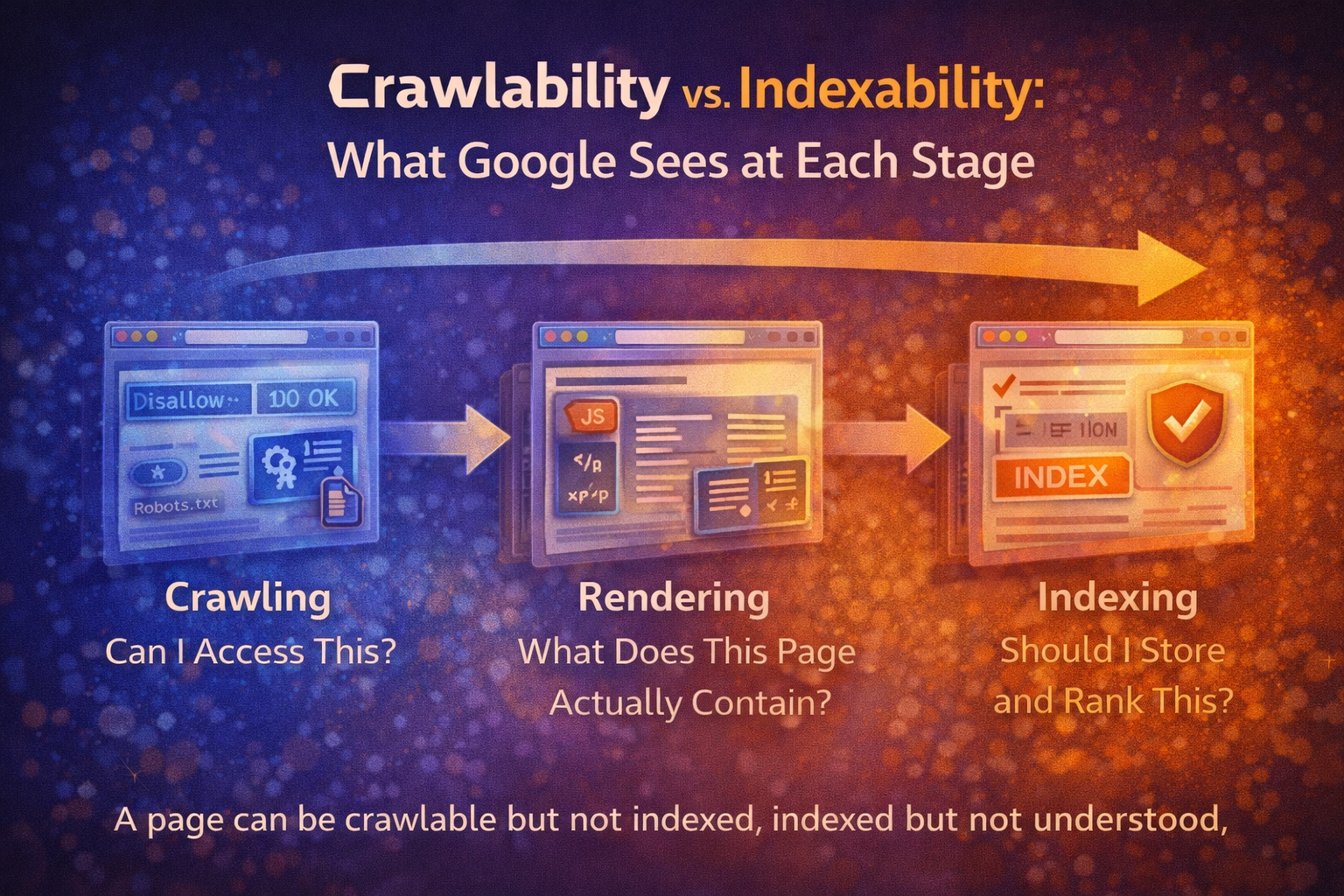
Most SEO advice treats crawling and indexing as the same thing.
They aren’t.
A page can be:
- Crawlable but not indexed
- Indexed but not understood
- Rendered partially
- Canonicalised away
- Technically valid yet strategically invisible
If you don’t understand what happens at each stage, you can fix the wrong problem for months.
This is one of the most common blind spots uncovered in a thorough seo audit.
Let’s break it down properly.
The Three Stages Most People Confuse
When Google processes a page, it typically moves through three core stages:
- Crawling
- Rendering
- Indexing
Each stage answers a different question.
Stage 1: Crawling — “Can I Access This?”
Crawling is simply Google discovering and requesting your URL.
At this stage, Google checks:
- Does the server respond?
- What is the HTTP status?
- Is the URL blocked by robots.txt?
- Is the URL discoverable via links or sitemaps?
If the answer is “yes”, the page is crawlable.
That does not mean it will rank.
It only means Google can access it.
Common Crawl Blockers
- robots.txt disallow rules
- Incorrect nofollow usage
- Broken internal links
- Orphaned pages
- Crawl budget inefficiencies
A website seo checker can usually confirm crawlability quickly.
But crawling is just the first gate.
Stage 2: Rendering — “What Does This Page Actually Contain?”
After crawling, Google renders the page.
This means:
- Executing JavaScript
- Building the DOM
- Loading visible content
- Interpreting structure
Rendering answers:
What does the user actually see?
If key content:
- Loads late
- Depends on JS without fallback
- Is hidden behind interactions
- Requires API calls
Google may not see it fully.
A page can pass crawl checks but still fail rendering clarity.
This is where many modern sites struggle — especially JavaScript-heavy builds.
A free website seo checker may flag rendering warnings even when the page loads perfectly in a browser.
Stage 3: Indexing — “Should I Store and Rank This?”
Indexing is where Google decides:
- Is this page unique enough?
- Is it valuable?
- Does it conflict with another page?
- Is it canonicalised elsewhere?
A page can be:
- Crawled ✔
- Rendered ✔
- Still excluded from index ❌
Indexing is not guaranteed.
It is a quality and clarity decision.
Crawlable ≠ Indexable ≠ Understood
Here’s where confusion causes frustration.
You might check:
- URL inspection: Crawl successful
- Status code: 200
- Page not blocked
So you assume:
“It’s fine.”
But indexing and understanding depend on more subtle signals.
Let’s explore the most common blockers.
Common Crawlability & Indexing Blockers
1️⃣ robots.txt Conflicts
Robots.txt controls crawling.
If you accidentally block:
Disallow: /blog/
Google won’t crawl those URLs.
But here’s the nuance:
If external links point to that URL, Google may still index it — without crawling it.
Result:
Indexed page with no content context.
This leads to ghost listings and confusion.
2️⃣ Meta Robots Issues
Meta robots control indexing.
Examples:
<meta name="robots" content="noindex,follow">
This allows crawling but blocks indexing.
Common problems:
- Staging noindex left live
- Template-level noindex accidentally applied
- noindex combined with canonical conflicts
A page can be perfectly crawlable — yet permanently excluded from rankings.
3️⃣ Canonical Ambiguity
Canonicals answer:
Which version of this page should rank?
Problems arise when:
- Canonical points to another page unnecessarily
- Multiple pages canonicalise to the homepage
- Self-referencing canonicals are missing
- Canonicals conflict with internal linking
Result:
Google may index a different URL than you expect.
Or ignore your intended primary page entirely.
This is frequently discovered during a structured seo audit.
4️⃣ Duplicate or Near-Duplicate Content
If multiple pages are too similar:
Google must choose.
Even without penalties, it may:
- Index only one
- Rotate visibility
- Ignore weaker versions
You may think:
“The page is live.”
Google may think:
“I already have this elsewhere.”
That’s misunderstanding — not malfunction.
Real-World Example Scenarios
Example 1: The Invisible Blog Post
- Page returns 200
- Not blocked by robots.txt
- Meta robots = index
- Sitemap submitted
But:
- Main content injected via JavaScript
- No fallback HTML
- Google renders partial content
Result:
Indexed page with thin visible content.
Outcome:
Poor rankings despite “passing checks”.
Example 2: The Canonical Mistake
- Service page canonicalises to homepage
- Internal links point to service page
- Sitemap lists service page
Google receives mixed signals.
It may:
- Index homepage only
- Ignore the service page
- Hesitate to rank either strongly
Technically crawlable.
Strategically diluted.
Example 3: The Duplicate Cluster
- Five similar blog posts targeting slight keyword variations
- No clear canonical strategy
- Overlapping copy
Google chooses one.
The others stagnate.
Owner assumption:
“Google isn’t indexing my content.”
Reality:
Google consolidated it.
How To Inspect What Google Truly Sees
To reduce fear and uncertainty, you need visibility.
Here’s how to look under the hood.
1️⃣ Google Search Console URL Inspection
This shows:
- Crawl status
- Indexing status
- Rendered HTML snapshot
- Canonical chosen by Google
Compare:
- “User-declared canonical”
- “Google-selected canonical”
If they differ, investigate.
2️⃣ View Rendered HTML
Don’t just view page source.
Use:
- URL inspection “View crawled page”
- Fetch & render tools
- Mobile-friendly test
Compare:
- Raw HTML
- Rendered HTML
Is key content missing in raw form?
That’s a rendering risk.
3️⃣ Use a Structured SEO Audit
A proper website seo checker should highlight:
- Indexability issues
- Canonical conflicts
- Robots directives
- Rendering warnings
- Duplicate clusters
Not just surface errors — but interpretation risks.
Why This Matters
Many site owners panic when rankings stall.
They assume:
- The site is broken
- Google is ignoring them
- They need more backlinks
Often, the issue lies in misunderstanding what stage the page is failing at.
Crawl issue?
Rendering issue?
Indexing issue?
Intent issue?
When you separate the stages, confusion disappears.
Clarity replaces guesswork.
Final Insight: Understanding Reduces Fear
Crawlability is access.
Rendering is visibility.
Indexing is acceptance.
A page can succeed at one and fail at another.
If you understand the pipeline, you stop treating SEO like magic.
You start diagnosing it like a system.
And that’s where confidence — and rankings — grow.
Share this content:



Post Comment